¿Cómo puedo hacer en CSS Html un formulario de donación usando los botones de Paypal? |
| On May 05, 2021, in Leadership and Attitude, by Neculai Fantanaru |
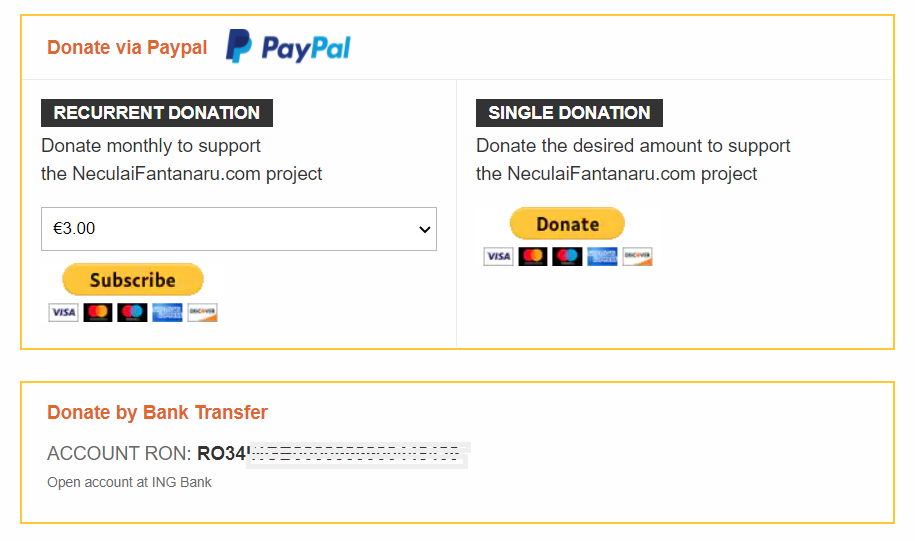
Puedes ver el código completo aquí: https://jsfiddle.net/L27vz06u/
--- PASO 1 --- Inicie sesión en PayPal y vaya a https://www.paypal.com/buttons/ como para obtener el código de enlace para el botón deseado. En este caso, seleccione el código del botón DONAR. El código de enlace para el botón Donar debería verse así:
https://www.paypal.com/donate?hosted_button_id=27KSZ3KQSC
y PayPal también le proporciona el código del botón, que debería verse así:
 <form action="https://www.paypal.com/donate" method="post" target="_top">
<input type="hidden" name="hosted_button_id" value="77FLYC2Z7JBUL" />
<input class="paypal-img" type="image" src="https://www.paypalobjects.com/en_US/i/btn/btn_donateCC_LG.gif" border="0" name="submit" title="PayPal - The safer, easier way to pay online!" alt="Donate with PayPal button" />
<img alt="" border="0" src="https://www.paypal.com/en_US/i/scr/pixel.gif" width="1" height="1" />
</form>
--- PASO 2 --- Copie la siguiente línea antes de su etiqueta </head> y reemplácela con el nombre de su sitio web:
<link rel="stylesheet" type="text/css" href="https://YOUR-WEBSITE.com/paypalform.css"/>
Este es el código para el archivo css llamado paypalform.css :
.paypal-form {
border: 2px solid #FFC734;
}
.paypal-form hr {
margin:0;
}
.paypal-form h4{
font-size:16px;
}
paypal-form .paypal-header {
display: flex;
align-items: center;
padding: 10px 20px;
    }
paypal-form .paypal-header .header-text {
margin-right: 15px;
color: #DF662F;
margin-top: 0;
margin-bottom: 0;
font-size:15px;
        }
paypal-form .paypal-header img{
width:100px;
height:30px;
    }

paypal-form .paypal-body {
display: grid;
grid-template-columns: 1fr 1fr;
padding: 0;
border-top: 1px solid #efe9e9;
    }
paypal-form .paypal-body .col {
padding: 15px 15px;
padding-bottom:20px;
        }
paypal-form .paypal-body .col:first-child {
border-right: 1px solid #efe9e9;
            }

paypal-form .paypal-body h4 {
margin: 0;
background-color: #333333;
color: white;
display: inline-block;
padding: 3px 10px;
text-transform:uppercase;
font-size:14px;
        }
paypal-form .paypal-body p{
font-size:15px;
line-height:1.5;
margin-top:4px;
    }
paypal-form .paypal-content{
display:flex;
flex-direction:column;

    }
paypal-form .paypal-content form {
display: flex;
flex-direction: column;
    }
paypal-form .paypal-content select {
height: 35px;
margin-bottom: 10px;
padding-left: 5px;
border: 1px solid #bdb5b5;
        }
paypal-form .paypal-content .paypal-img {
align-self: flex-start;
border:none !important;
        }

media(max-width:768px){
paypal-form .paypal-body {
grid-template-columns: 1fr;
            }
paypal-form .paypal-body .col:first-child {
border-bottom: 1px solid #efe9e9;
                }
        }

.paypal-contact {
padding: 15px 20px;
padding-bottom:25px;
border: 2px solid #FFC734;
margin-top: 25px;
margin-bottom: 20px;
}
.paypal-contact * {
margin:0;
font-size:15px;
}

paypal-contact h4 {
color: #DF662F;
margin-bottom:15px;
        }
paypal-contact p {
margin-bottom: 8px;
font-weight:bold;
        }
paypal-contact p span {
color: dimgrey;
text-transform:uppercase;
font-weight:normal;
margin-bottom: 15px;*/
        }
paypal-contact .text-muted {
font-size:11px;
color:dimgrey;
margin-bottom: 15px;*/
        }

.paypal-form-button{
display:flex;
flex-direction:column;
}
--- PASO 3 --- Copie este código html donde desee que aparezca en su página html (y reemplace el hosted_button_id and <form action= ... </form> del código a continuación, con su código de PayPal)
<!-- Donation Form START -->

<div class="paypal-form" >
<div class="paypal-header">
<h4 class="header-text">Donate via Paypal</h4>
<img src="https://neculaifantanaru.com/paypal.png" alt="Alternate Text" />
</div>
<!-- Identify your business so that you can collect the payments. -->
<div class="paypal-body">
<div class="col">
<div class="body-text">
<h4>RECURRENT DONATION</h4>
<p>Donate monthly to support <br>the NeculaiFantanaru.com project</p>
</div>
<div class="paypal-content">

<!-- PayPal DONATION COMBO BOX. Replace with your hosted_button_id-->

<form action="https://www.paypal.com/donate?hosted_button_id=27KSZ3KQSC" method="post" class="den_webinar">

<!-- Identify your business so that you can collect the payments. -->
<input type="hidden" name="business" value="YOUR EMAIL ADDRESS">

<!-- Specify a Donate button. -->
<input type="hidden" name="cmd" value="_donations">

<!-- Specify details about the contribution -->
<input type="hidden" name="item_name" value="Donation">
<input type="hidden" name="item_number" value="Donation">
<select name="amount"><option value="3.00">€3.00</option><option value="5.00">€5.00</option><option value="10.00">€10.00</option><option value="25.00">€25.00</option><option value="50.00">€50.00</option></select>
<input type="hidden" name="currency_code" value="EUR">

<!-- Display the payment button. -->
<input class="paypal-img" type="image" src="https://www.paypalobjects.com/en_US/i/btn/btn_subscribeCC_LG.gif" border="0" name="submit" title="PayPal - The safer, easier way to pay online!" alt="Donate with PayPal button" />
</form>


</div>
</div>
<div class="col">
<div class="body-text">
<h4>SINGLE DONATION</h4>
<p>Donate the desired amount to support <br>the NeculaiFantanaru.com project</p>
</div>
<div class="paypal-content">

<!-- YOUR PAYPAL FORM BUTTON -->

<form action="https://www.paypal.com/donate" method="post" target="_top">
<input type="hidden" name="hosted_button_id" value="77FLYC2Z7JBUL" />
<input class="paypal-img" type="image" src="https://www.paypalobjects.com/en_US/i/btn/btn_donateCC_LG.gif" border="0" name="submit" title="PayPal - The safer, easier way to pay online!" alt="Donate with PayPal button" />
<img alt="" border="0" src="https://www.paypal.com/en_US/i/scr/pixel.gif" width="1" height="1" />
</form>

<!-- YOUR PAYPAL FORM BUTTON -->

</div>
</div>

</div>

</div>
<div class="paypal-contact">
<h4>Donate by Bank Transfer</h4>
<p>
<span>Account Ron: </span>
RO34INGB0000999900448439</p>
<div class="text-muted">
Open account at ING Bank
</div>
</div>

<!-- Donation Form Finnish -->
Eso es todo amigos.
Por favor, mire el formulario a continuación y vea cómo funciona.
Artículos recientes consultados por lectores:
- La imagen de una rosa del apogeo del siglo sin edad
- Firma tu nombre en mi corazón
- Tu sonrisa pintada
- Constelación Tatiana
( )




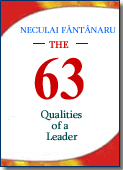 Por qué leer este libro? Porque es fundamental para optimizar el rendimiento. Porque revela las coordenadas principales después de que se construyen el carácter y las habilidades de los líderes, poniendo de relieve lo que es importante para ellos para aumentar su influencia.
 La característica esencial de este libro en comparación con otros en el mercado en el mismo dominio que se describe a través de ejemplos de las competencias ideales de un líder. Nunca me dijo que es fácil llegar a ser un buen líder, pero si la gente ...
 Para algunos líderes, "líder" se asemeja más a un juego de ajedrez, un juego de astucia y perspicacia, para otros significa un juego de azar, un juego que piensan que pueden ganar cada vez que arriesgar y apostar todo en una sola tarjeta.
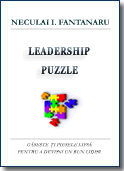 He escrito este libro que une en un desarrollo personal manera sencilla con el liderazgo, al igual que un rompecabezas, donde usted tiene que coincidir con todas las piezas que figuran en el fin de recomponer la imagen en general.
 El objetivo de este libro es ofrecer información a través de ejemplos concretos y que le muestre cómo obtener la capacidad de hacer ver las cosas desde el mismo ángulo que usted.
 Sin tener en cuenta que la concordia, el libro representa el intento de un hombre común - el autor - que a través de simples palabras, hechos y ejemplos infunde el valor habitual para el hombre común y optimismo en su propia búsqueda para ser su propio amo y quién sabe. .. tal vez ni siquiera un líder.

