Comment puis-je créer en Css Html un formulaire de don en utilisant les boutons Paypal? |
| On May 05, 2021, in Leadership and Attitude, by Neculai Fantanaru |
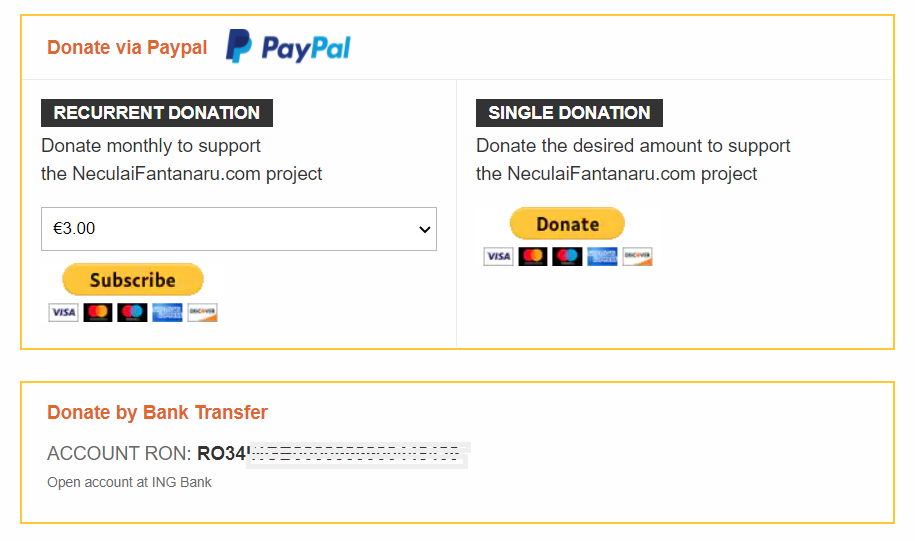
Vous pouvez voir l'intégralité du code ici: https://jsfiddle.net/L27vz06u/
--- Etape 1 --- Connectez-vous à PayPal et accédez à https://www.paypal.com/buttons/ pour obtenir le code de lien pour le bouton souhaité. Dans ce cas, sélectionnez DONNEZ le code du bouton. Le code du lien pour Donate Button devrait ressembler à ceci:
https://www.paypal.com/donate?hosted_button_id=27KSZ3KQSC
et PayPal vous fournit également le code du bouton, qui devrait ressembler à ceci:
 <form action="https://www.paypal.com/donate" method="post" target="_top">
<input type="hidden" name="hosted_button_id" value="77FLYC2Z7JBUL" />
<input class="paypal-img" type="image" src="https://www.paypalobjects.com/en_US/i/btn/btn_donateCC_LG.gif" border="0" name="submit" title="PayPal - The safer, easier way to pay online!" alt="Donate with PayPal button" />
<img alt="" border="0" src="https://www.paypal.com/en_US/i/scr/pixel.gif" width="1" height="1" />
</form>
--- Etape 2 --- Copiez la ligne suivante avant votre balise </head> et remplacez-la par le nom de votre site Web:
<link rel="stylesheet" type="text/css" href="https://YOUR-WEBSITE.com/paypalform.css"/>
Ceci est le code du fichier css nommé paypalform.css :
.paypal-form {
border: 2px solid #FFC734;
}
.paypal-form hr {
margin:0;
}
.paypal-form h4{
font-size:16px;
}
paypal-form .paypal-header {
display: flex;
align-items: center;
padding: 10px 20px;
    }
paypal-form .paypal-header .header-text {
margin-right: 15px;
color: #DF662F;
margin-top: 0;
margin-bottom: 0;
font-size:15px;
        }
paypal-form .paypal-header img{
width:100px;
height:30px;
    }

paypal-form .paypal-body {
display: grid;
grid-template-columns: 1fr 1fr;
padding: 0;
border-top: 1px solid #efe9e9;
    }
paypal-form .paypal-body .col {
padding: 15px 15px;
padding-bottom:20px;
        }
paypal-form .paypal-body .col:first-child {
border-right: 1px solid #efe9e9;
            }

paypal-form .paypal-body h4 {
margin: 0;
background-color: #333333;
color: white;
display: inline-block;
padding: 3px 10px;
text-transform:uppercase;
font-size:14px;
        }
paypal-form .paypal-body p{
font-size:15px;
line-height:1.5;
margin-top:4px;
    }
paypal-form .paypal-content{
display:flex;
flex-direction:column;

    }
paypal-form .paypal-content form {
display: flex;
flex-direction: column;
    }
paypal-form .paypal-content select {
height: 35px;
margin-bottom: 10px;
padding-left: 5px;
border: 1px solid #bdb5b5;
        }
paypal-form .paypal-content .paypal-img {
align-self: flex-start;
border:none !important;
        }

media(max-width:768px){
paypal-form .paypal-body {
grid-template-columns: 1fr;
            }
paypal-form .paypal-body .col:first-child {
border-bottom: 1px solid #efe9e9;
                }
        }

.paypal-contact {
padding: 15px 20px;
padding-bottom:25px;
border: 2px solid #FFC734;
margin-top: 25px;
margin-bottom: 20px;
}
.paypal-contact * {
margin:0;
font-size:15px;
}

paypal-contact h4 {
color: #DF662F;
margin-bottom:15px;
        }
paypal-contact p {
margin-bottom: 8px;
font-weight:bold;
        }
paypal-contact p span {
color: dimgrey;
text-transform:uppercase;
font-weight:normal;
margin-bottom: 15px;*/
        }
paypal-contact .text-muted {
font-size:11px;
color:dimgrey;
margin-bottom: 15px;*/
        }

.paypal-form-button{
display:flex;
flex-direction:column;
}
--- Etape 3 --- Copiez ce code html à l'endroit où vous souhaitez qu'il apparaisse sur votre page html (et remplacez le hosted_button_id and <form action= ... </form> cod below, with your code from PayPal )
<!-- Donation Form START -->

<div class="paypal-form" >
<div class="paypal-header">
<h4 class="header-text">Donate via Paypal</h4>
<img src="https://neculaifantanaru.com/paypal.png" alt="Alternate Text" />
</div>
<!-- Identify your business so that you can collect the payments. -->
<div class="paypal-body">
<div class="col">
<div class="body-text">
<h4>RECURRENT DONATION</h4>
<p>Donate monthly to support <br>the NeculaiFantanaru.com project</p>
</div>
<div class="paypal-content">

<!-- PayPal DONATION COMBO BOX. Replace with your hosted_button_id-->

<form action="https://www.paypal.com/donate?hosted_button_id=27KSZ3KQSC" method="post" class="den_webinar">

<!-- Identify your business so that you can collect the payments. -->
<input type="hidden" name="business" value="YOUR EMAIL ADDRESS">

<!-- Specify a Donate button. -->
<input type="hidden" name="cmd" value="_donations">

<!-- Specify details about the contribution -->
<input type="hidden" name="item_name" value="Donation">
<input type="hidden" name="item_number" value="Donation">
<select name="amount"><option value="3.00">€3.00</option><option value="5.00">€5.00</option><option value="10.00">€10.00</option><option value="25.00">€25.00</option><option value="50.00">€50.00</option></select>
<input type="hidden" name="currency_code" value="EUR">

<!-- Display the payment button. -->
<input class="paypal-img" type="image" src="https://www.paypalobjects.com/en_US/i/btn/btn_subscribeCC_LG.gif" border="0" name="submit" title="PayPal - The safer, easier way to pay online!" alt="Donate with PayPal button" />
</form>


</div>
</div>
<div class="col">
<div class="body-text">
<h4>SINGLE DONATION</h4>
<p>Donate the desired amount to support <br>the NeculaiFantanaru.com project</p>
</div>
<div class="paypal-content">

<!-- YOUR PAYPAL FORM BUTTON -->

<form action="https://www.paypal.com/donate" method="post" target="_top">
<input type="hidden" name="hosted_button_id" value="77FLYC2Z7JBUL" />
<input class="paypal-img" type="image" src="https://www.paypalobjects.com/en_US/i/btn/btn_donateCC_LG.gif" border="0" name="submit" title="PayPal - The safer, easier way to pay online!" alt="Donate with PayPal button" />
<img alt="" border="0" src="https://www.paypal.com/en_US/i/scr/pixel.gif" width="1" height="1" />
</form>

<!-- YOUR PAYPAL FORM BUTTON -->

</div>
</div>

</div>

</div>
<div class="paypal-contact">
<h4>Donate by Bank Transfer</h4>
<p>
<span>Account Ron: </span>
RO34INGB0000999900448439</p>
<div class="text-muted">
Open account at ING Bank
</div>
</div>

<!-- Donation Form Finnish -->
Ce sont tous des gens.
Please look at the form below and see how it works.
Articles récents consultés par les lecteurs:
- L'image d'une rose du plus haut du siècle sans âge
- Signe ton nom dans mon coeur
- Ton sourire peint
- Constellation Tatiana


 Pourquoi lire ce livre? Parce qu'il est essentiel d'optimiser vos performances. Parce qu'elle révèle les coordonnées principales qui sont, après la construction du personnage et les compétences des dirigeants, en soulignant ce qu'il est important pour eux d'accroître leur influence.
 La caractéristique essentielle de ce livre en comparaison avec d'autres sur le marché dans le même domaine, c'est qu'il décrit à travers des exemples les compétences idéales d'un leader. Je n'ai jamais prétendu que c'est facile de devenir un bon leader, mais si les gens vont ...
 Pour certains dirigeants, "leader" ressemble plus à un jeu d'échecs, un jeu d'intelligence et de perspicacité, pour d'autres cela signifie un jeu de hasard, un jeu qu'ils pensent qu'ils peuvent gagner à chaque fois risquer et paris tout sur une seule carte.
 J'ai écrit ce livre qui fait converger dans un développement moyen simple personnelles avec les dirigeants, tout comme un puzzle où vous devez faire correspondre toutes les pièces données, afin de recomposer l'image en général.
 Le but de ce livre est de vous offrir des informations à travers des exemples concrets et de vous montrer comment obtenir la capacité de rendre les autres voient les choses sous le même angle que vous.
 Sans prétendre à une concorde, le livre représente l'essayer sur un homme ordinaire - l'auteur - qui, à travers des mots simples, des faits et des exemples d'habitude inculque à l'homme ordinaire de courage et d'optimisme dans sa propre quête pour être son propre maître, et qui sait. .. peut-être même un leader.

